• Skip to primary navigation
  • Skip to main content
  • Skip to primary sidebar
  • Skip to footer

Justyna Dorsz

  • Blog
  • Store
  • Contact
  • About

Tutorial

Design ideas tutorial

Today I watched Michael Essek’s talk “How to come up with ideas that buyers love”.

There are two things that surprised me:

  • Michael has a much more professional attitude towards making designs. I sort of always just draw what I like. Michael, of course, likes to draw. But he also runs a business. I think I should learn from him.
  • I thought I had a lot of designs. I have now about 240 designs but not all of them are completely unique. Some are just different versions of the save design. Michael has over 2000 designs! He said that maybe even up to 5000 if you include all variants. That’s insane! When did he draw all that?

The talk was very informative and motivating. Go watch it.

August 26, 2021 Tagged With: Ideas, Learn, Michael Essek, Tutorial

Roam Research – Templates

I make notes about all the books and articles that I read, about anything useful that I learn. I note down all my ideas, I plan my future projects, I write down notes from courses I take. And while I work I chronicle the process.

For all that I use Roam Research. It’s kind of like my second brain. I wrote a bit about it before.

One feature that I’ve found out about recently is: Templates. When you keep writing the same things over and over again you can use templates to speed up the process. For example, when I read a book and want to add it to my Roam, I create a new page for that book. And then I add notes: the author, keywords, sometimes quotes. Now however I can create a template so that notes for each book follow the same structure.

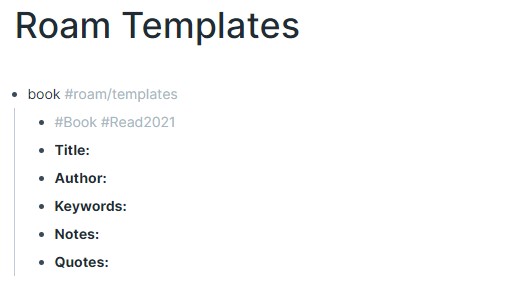
The format for the template is:

The first line is key: you need a trigger to be able to use your template, and you need to add “#roam/templates” to specify that it’s a template.

I created a new page in Roam called “Roam Templates” to keep all my templates there and added the first template The template is for book notes, the trigger is — “book”:

All the sub-blocks: “Title”, “Author”, etc, are the content of the template.

Now that my template is declared I can use it wherever I want.

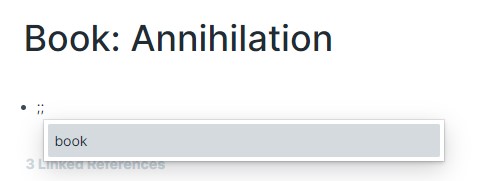
I go to another page that I created for the book “Annihilation” which I’ve read recently. To use the template I need to call a trigger, you do that by writing a semicolon twice: “;;”

When I write “;;” I get the list of all my templates. For now, there’s only one template: “book”. I select it, press enter, and my template shows up:

Now I can simply add all the data I want to have here. And then I can use the same template for other books.

May 26, 2021 Tagged With: Productivity, Roam, Tutorial

Primary Sidebar

About Me

My name is Justyna. I am an artist and an indie game developer.

Let’s connect!
@JustynaDorsz

LINKS

Cat Book Newsletter
Fox Shiver – my designs!
TRUFFLEPIG – cats!
Our Games

  • Instagram
  • Pinterest
  • RSS
  • Twitter

My designs

AND MORE…

I rarely send something...

Popular posts

  • Can you make money on Threadless?
  • reMarkable 2 Review
  • Unity Input System vs Rewired
  • Why you don’t see your designs on Threadless
  • Is Threadless worth it?
  • Roam Research – Templates
  • My most popular design ever
  • Overthinking and also hungry
  • I hired a law firm
  • How to name your store

USEFUL

DMCA Template

Topics

  • Advice (27)
  • Art (12)
  • Artist Life (12)
  • Cats (66)
  • Copyright (10)
  • Design (88)
  • Games (8)
  • Law (8)
  • Mindset (14)
  • Money (11)
  • Our book (14)
  • reMarkable (9)
  • Stats (10)
  • Threadless (33)
  • Threadless Artist Shop (13)
  • Work in progress (12)

Footer

  • Instagram
  • Pinterest
  • RSS
  • Twitter

Newsletter

Justyna Dorsz · Copyright © 2012–2025 · Log in